
Needs details
3
Site, supervisor or principal contractor fields missing
Create the SWMS, collect sign-off and send the PDF to the builder without the paperwork chase.
Details, required sign-off and ready-to-send records.
Needs details
3
Site, supervisor or principal contractor fields missing
Waiting for sign-off
5
Required workers still need to review
Ready to send
2
Issued and signed, waiting for the PDF send
Richmond warehouse conversion
waiting for 2 required signers
Brunswick mixed-use project
ready to send
Fitzroy health clinic rough-in
sent to principal contractor
The hard part is not just writing the SWMS. It is making sure the site details are right, workers have signed, the PDF has gone to the builder or principal contractor, and the business has a record of what was sent.
Start with the SWMS, get the required sign-off, send the PDF, then keep the sent record with the job.
Start from a structured Australian trade template, then add the site, principal contractor, supervisor, work activity and high-risk construction work details.
Send the SWMS to the workers who need to review it. Once the SWMS is issued, they can sign from site and admin can see who is still outstanding.
Email the issued SWMS PDF to the builder, principal contractor or site contact from an Unlimited account. SiteWise keeps the sent status, recipient, timestamp and PDF version with the record. Auto-send after required sign-off is planned.
A SWMS is not ready just because a draft exists. SiteWise helps show what still needs attention: missing site details, required sign-off, unsent PDFs, failed sends or records updated after sending.
Details, required sign-off, send status and records.
Needs details
3
Site, supervisor or principal contractor fields missing
Waiting for sign-off
5
Required workers still need to review
Ready to send
2
Issued and signed, waiting for the PDF send
Sent
12
PDFs sent and kept with the SWMS record
Send failed
1
Needs another attempt
Updated after send
2
Changed records that need review
Richmond warehouse conversion
Waiting for 2 required signers
Brunswick mixed-use project
Issued SWMS ready to send
Fitzroy health clinic rough-in
Sent to principal contractor
Carlton tenancy fit-off
PDF changed after send
When the SWMS is ready, SiteWise can send the PDF to the builder or principal contractor using your business details. The email is about your business and the site record. SiteWise stays in the background.
PDF sending is available for Unlimited accounts. Manual PDF export remains available for SWMS credit records.
Attach the issued PDF and keep the send record with the SWMS.
From
Harrington Electrical Group
Recipient
site@northbank.example
Brunswick mixed-use SWMS v3
Status
Ready to send
After send
Recipient, timestamp and PDF version kept
Planned auto-send
Send to site admin after required sign-off
Use SiteWise to build the SWMS, track required sign-off, send the PDF and keep the record, without digging through folders and email threads.
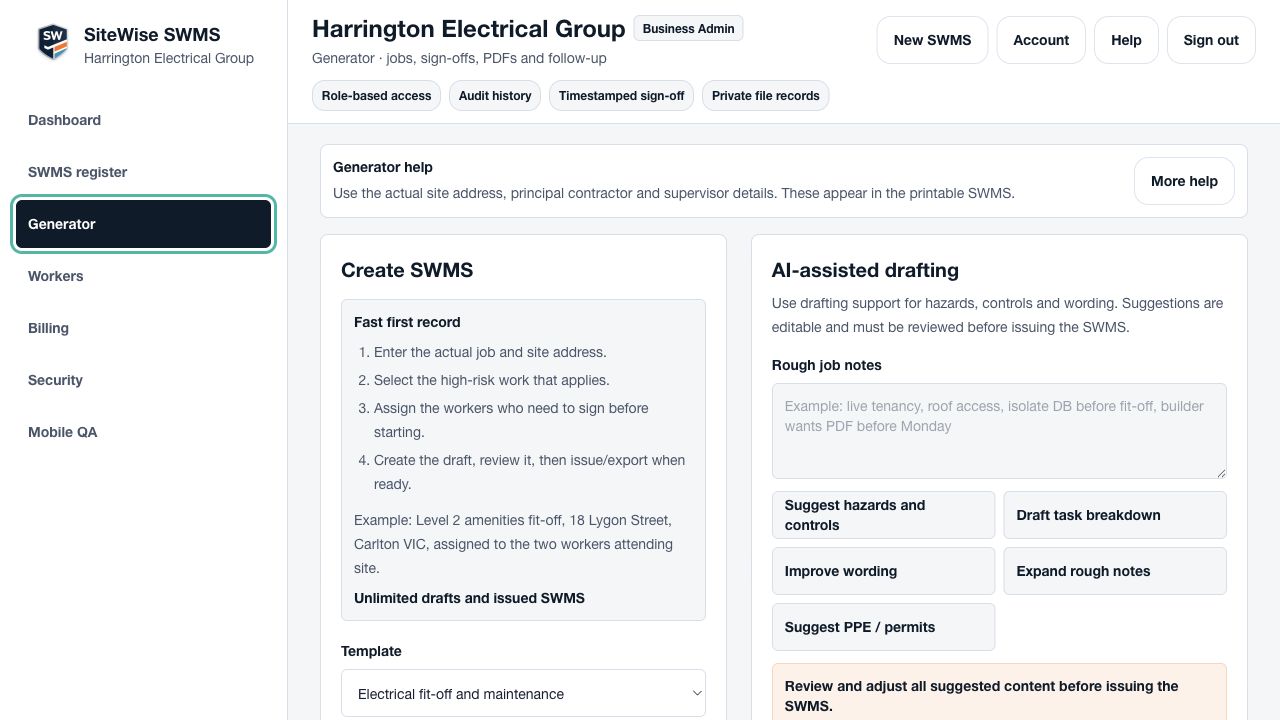
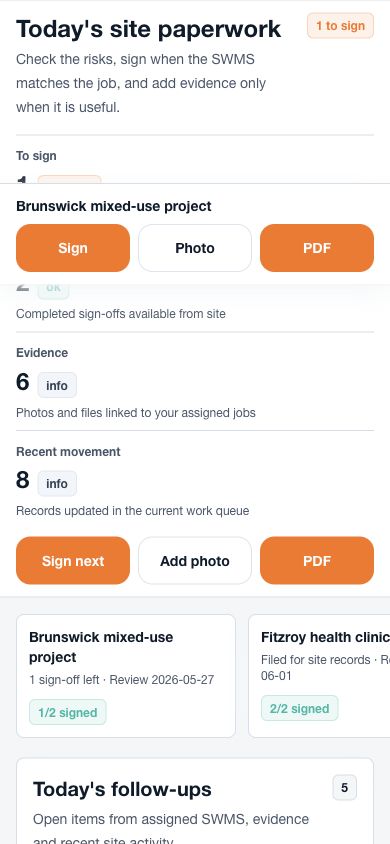
Use structured SWMS templates for common Australian trade work instead of starting from a blank document.
Add the site, work activity, high-risk construction work, hazards, controls and responsible people before issue.
Assigned workers can review the SWMS and sign from a phone, while admin can see who is still outstanding.
Unlimited accounts can send the issued PDF to the builder or principal contractor, then keep the sent status, PDF version, signatures and evidence with the SWMS.
Need the occasional SWMS? Buy credits for $5 each and redeem one when you build and issue a SWMS record. Creating SWMS regularly? Choose Unlimited for $39 per month AUD.
1 credit = 1 issued SWMS record.
Best for: Occasional SWMS work, tender requests and one-off site records.
$5 per credit
For crews creating SWMS across jobs, workers and principal contractors.
Best for: Active crews preparing SWMS across multiple jobs, workers and principal contractors.
$39 per month AUD
Straight answers for trade businesses using SiteWise to build, sign, send and keep SWMS records.
SWMS credits are for businesses that only need the occasional SWMS. Buy credits for $5 each, then redeem one credit when you build and issue a SWMS record.
One credit gives you one issued SWMS record with worker sign-off, PDF export, evidence attachments and stored records.
Yes. Unlimited accounts can email the issued SWMS PDF to the recipient they choose, with the sent status kept on the SWMS record.
Yes. The PDF should be attached to the email so the recipient receives the document directly, without relying only on a login link.
The email uses your business details and focuses on your business, the site and the SWMS record. SiteWise stays in the background.
Yes. Assigned workers can review the SWMS and sign from a phone after the SWMS is issued.
Required sign-off means the number of worker signatures needed before the SWMS is treated as signed. SiteWise tracks who has signed and who is still outstanding.
Auto-send is planned. The flow is: build the SWMS, send it to required workers to sign, then once required sign-off is complete, the SWMS PDF can automatically go to the site admin. Manual send and manual export stay available.
No software can guarantee compliance. SiteWise helps structure the SWMS process, but your business is responsible for reviewing the SWMS, making it site-specific and ensuring it suits the work, site and legal requirements.
If the SWMS changes after sending, SiteWise can mark it as updated after send so admin knows an updated version may need to go out.
Build the SWMS, collect required sign-off, send the PDF to the builder or principal contractor and keep the record together.